I found this explanation in the forum:
You must update code of the class in /model directory.
Complete the array $_fieldsAttributes to add "theDesiredField"=>"hidden".
The field "theDisiredField" will then automatically be hidden.
On the "Ticket", II am trying to hide some fields, where can I find the list of the fields ? I mean the label and "theDesiredField" are not the same and I faced some confusion trying to find the proper field.
How can I hide a full section like the "Product section" or "Notes" or "Attachments"?
Last edit: 12 Juil 2017 12:04 by Kitcat711. Reason: Fixed my first issues
Yeah, I found the way to doit for the "Orgin Field", but this is not always easy to find the proper field "name".
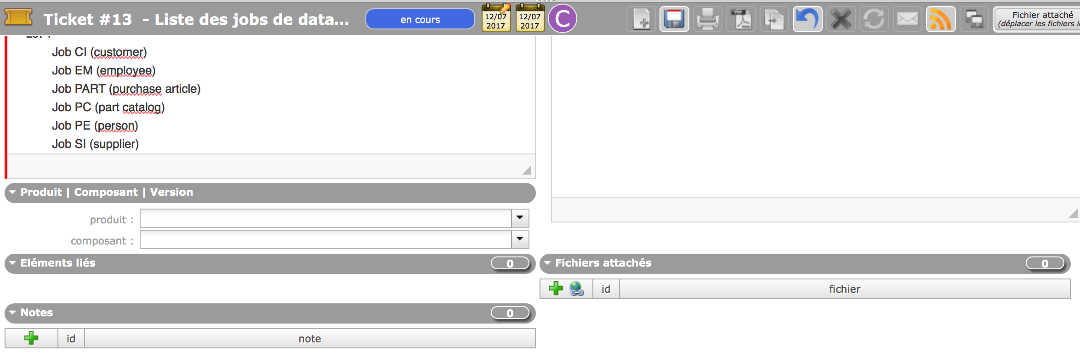
On this screenshot you can see that I removed the "Links" field, but the section title still remains.
"Elements liés"
How ca I remove the full section here?
Thank you.
Attachments:
Last edit: 13 Juil 2017 10:23 by Kitcat711. Reason: Kept on work on it, my question is improving
The three sections "Links", "Attachments" and "Notes" have very specific behavior, as they are used on almost all items.
To hide link section, you'll have to comment corresponding line
En poursuivant votre navigation, vous acceptez le dépôt de cookies tiers destinés au bon fonctionnement et à la sécurisation du site (gestion de session, reCaptcha) et à une analyse statistique anonymisée des accès sur notre site (Google Analytics). Si vous vous inscrivez, les informations que vous fournirez ne seront jamais divulguées à un tiers sous quelque forme que ce soit. En savoir plus
Paramétrages de cookies
×
Cookies fonctionnels
Ce site utilise des cookies pour assurer son bon fonctionnement et ne peuvent pas être désactivés de nos systèmes. Nous ne les utilisons pas à des fins publicitaires. Si ces cookies sont bloqués, certaines parties du site ne pourront pas fonctionner.
Session
Veuillez vous connecter pour voir vos activités!
Autres cookies
Ce site web utilise un certain nombre de cookies pour gérer, par exemple, les sessions utilisateurs.
 Supportez nous sur Capterra